> For the complete documentation index, see [llms.txt](https://developers.tiqets.dev/llms.txt). Markdown versions of documentation pages are available by appending `.md` to page URLs; this page is available as [Markdown](https://developers.tiqets.dev/integration-guides/product-integration/increase-order-value-and-repeat-purchases-with-recommendations.md).
# Increase order value and repeat purchases with recommendations
As a travel distributor, maximising the value of every customer interaction requires more than just a smooth checkout. It requires delivering the right suggestion at the right moment.
We have leveraged tens of millions of booking data points to build a dedicated Recommendations Engine within the Tiqets API. By moving beyond static popularity lists or manual curation, you can now dynamically surface products tailored to your users' specific journeys.
Integrate the [Cross-sell recommendation endpoints](/basics/openapi/recommendations-api/get-cross-sell-recommendations.md) to drive incremental growth through two primary channels:
* Increase **Average Order Value** (AOV): Prompt customers to add complementary experiences to their shopping cart in real-time.
* Drive **Repeat Purchases**: Re-engage customers with relevant, data-driven offers post-purchase.
{% hint style="info" %}
We are manually enabling this feature for partners on a case-by-case basis. Reach out to get started.
{% endhint %}
***
### Best use cases for commercial impact
To maximise the revenue generated by these endpoints, we recommend the following integrations:
#### **1. The "in-cart" cross-sell**
**Where it fits:**
basket/cart page, side panel, or a lightweight “You might also like” module after an item is added.
**What to do:**
call the Cross-sell endpoint using the **ID of a product already in the basket**.
**Example:**
* The customer has **Colosseum tickets** in their basket.
* You display 3–5 cross-selling options such as **a city bus tour**, **a guided walking tour**, or **another nearby museum**.
Example of cross-sell recommendation
{% hint style="info" %}
**Tip**
Use `sort_by=conversion_rate` here. The user is close to checking out; popular, low-friction add-ons typically convert better than niche or complex products.
{% endhint %}
API Calls examples
```shellscript
curl -X GET "https://api.tiqets.com/v2/products/1106281/recommendations/cross-sell?exclude_product_ids=[]&product_tag_ids=[]&max_per_experience=1&sort_by=conversion_rate" \
-H "Authorization: Token " \
-H "Accept: */*" \
-H "User-Agent: YourCompanyName-CrossSell/1.0 (contact: you@yourcompany.com)"
```
```json
"recommendations": [
{
"product_id": 1100995,
"title": "Vatican Museums & Sistine Chapel: Hosted Entry Ticket",
"image_url": "https://aws-tiqets-cdn.imgix.net/images/content/a0172fe608a647858ba599c8eff1ebaf.jpeg?auto=format%2Ccompress&fit=crop&h=250&q=70&w=250&s=67301bd6b70d9b529f727cd53dee67c2",
"from_price": {
"amount": 34.50,
"currency": "EUR"
}
},
{
"product_id": 1090721,
"title": "St. Peter's Basilica: Audio Guide + Dome Access",
"image_url": "https://aws-tiqets-cdn.imgix.net/images/content/f05474a4997346c49a1feafdfabf1359.jpeg?auto=format%2Ccompress&fit=crop&h=250&q=70&w=250&s=d9efde16a4d027cf652d7899743ba413",
"from_price": {
"amount": 24.00,
"currency": "EUR"
}
},
{
"product_id": 975058,
"title": "City Sightseeing Rome: Hop-on Hop-off Open Bus Tour",
"image_url": "https://aws-tiqets-cdn.imgix.net/images/content/a9db847cd7a4465fb9be2110752a4da5.jpeg?auto=format%2Ccompress&fit=crop&h=250&q=70&w=250&s=2469c73a892fa0445ca130c0b93ea24a",
"from_price": {
"amount": 15.00,
"currency": "EUR"
}
},
```
#### **2. The post-purchase CRM campaign**
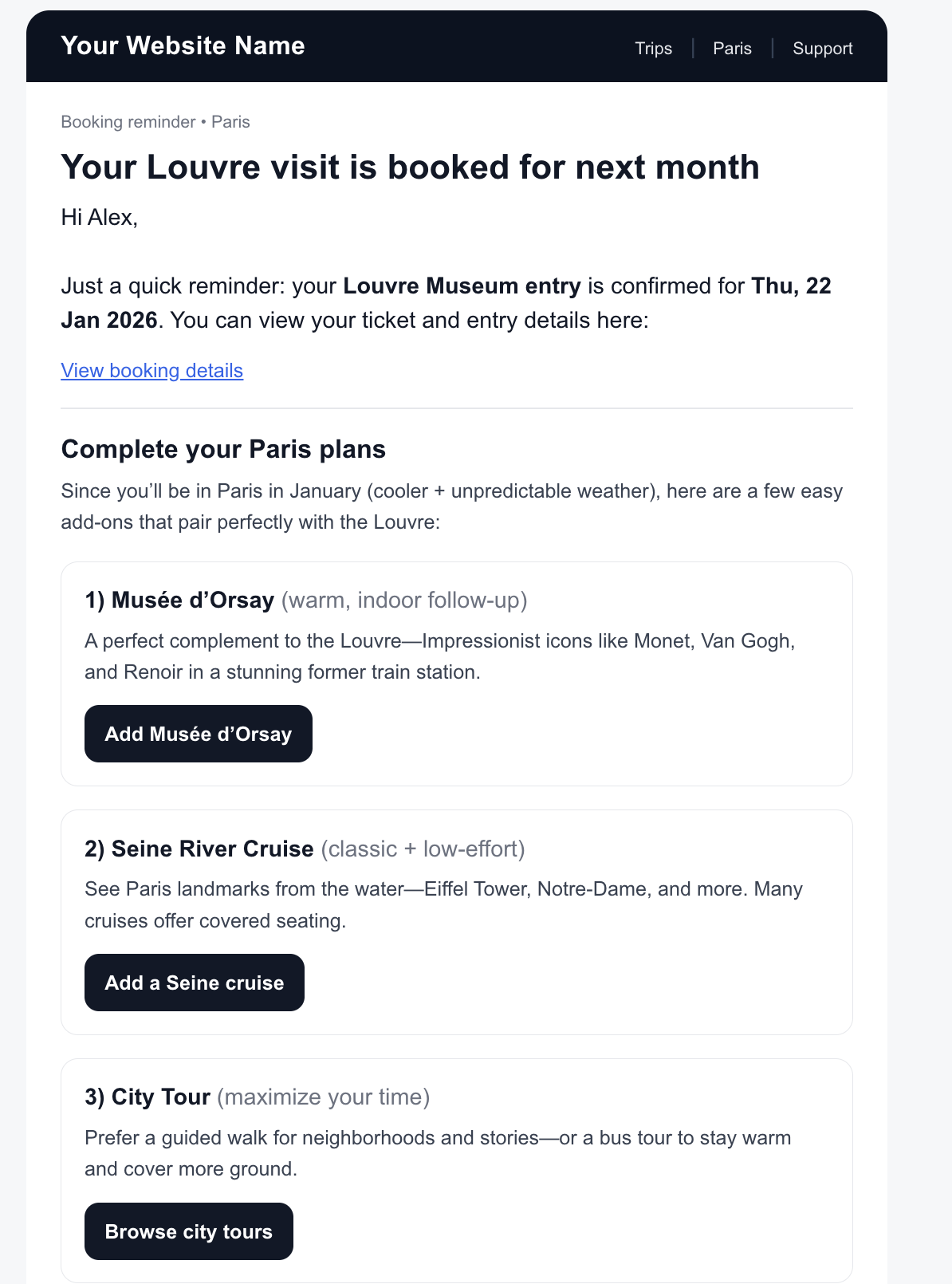
In your booking confirmation or date reminder emails, include a "Complete your trip" section.
**Where it fits:** \
booking confirmation emails, “your trip is coming up” reminders, or app push notifications.
**What to do:** \
call the endpoint using the **main product the customer bought**, and show a small curated section (usually 2–4 items).
**Example:**
* The customer has already booked Louvre entry for next month.
* In a reminder email, you can add a section like:
* *“Complete your Paris plans”* → **Seine river cruise**, **city tour**, **Musée d’Orsay**.
Example of simplified cross-sell email
* You can also use your own logic to tailor this (e.g., prefer indoor activities if the travel date is in winter, or family-friendly options when you know they booked children’s tickets).
{% hint style="info" %}
**Tip**
Use `sort_by=commission`. The user has already committed to the trip. This is an opportunity to introduce high-value, high-margin products they might have missed during the initial rush to book.
{% endhint %}
#### 3. Recommendation carousels to help browsing
**Where it fits:** \
Destination landing pages, Product pages, itinerary builders, and editorial content (guides, blog posts).
**What to do:** \
Call cross-sell based on a popular “anchor” product or visited product you’re featuring on the page.
**Example:**
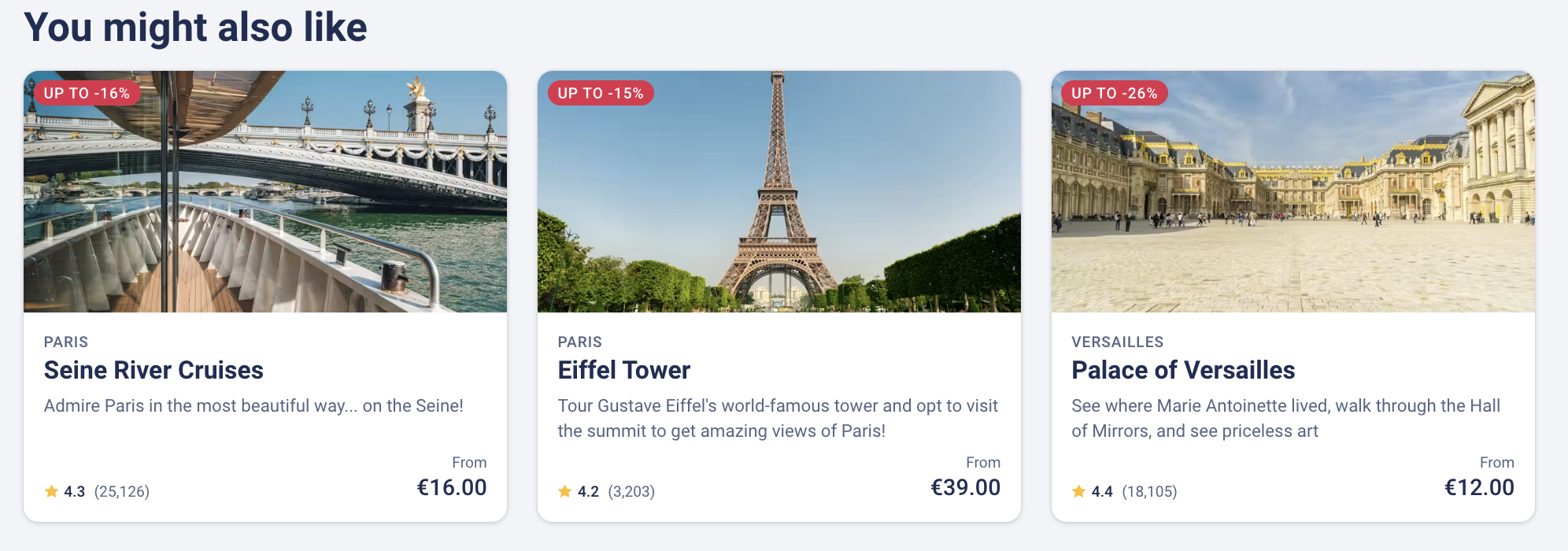
* On a product page "Louvre museum: E-ticket" page, you could feature a carousel of recommendations for other products:
Example of Carousel recommendations
{% hint style="info" %}
**Tip**
Keep the module contextual — a short block that supports discovery rather than a long list.
{% endhint %}
#### **4. Best elements to show in a discovery page**
(note: this use case doesn't actually need the `/recommendations` endpoints)
**Where it fits:** \
Destination landing pages, Experience pages (i.e. venues or activities).
**What to do:** \
You want to show the **best experiences** in your destination pages, and you want to show the **best products** in your experience pages. Just use our regular `/experiences` endpoint ([spec](/basics/openapi/content-api/experiences/search-and-filter-experiences.md)) and `/products` endpoint ([spec](/basics/openapi/content-api/products/search-and-filter-products.md)), which already return results to you ordered by popularity.
Call these endpoints with the query parameters `city_id` and `experience_id` respectively for an optimal result.
**Example:**
* On the Sagrada Familia discovery page make sure you organise the products with the most popular ones on top of the list:
#### **Filtering Logic**
Cross-sell performs best when the suggestions feel genuinely helpful. The filters below let you keep recommendations **relevant**, avoid duplicates, and tailor the module to the context of your page.
Here are several ways on how to keep your recommendations relevant using query parameters to filter the recommendations.
1. **Exclude what the customer already has:** `exclude_product_ids`
* **`exclude_product_ids`** a comma-separated list of product IDs to exclude.
2. **Keep recommendations on-theme:** `product_tag_ids`
* **`product_tag_ids`** filter recommendations by tag IDs (for example, “Guided tour”).
3. **Choose the right goal for each moment:** `sort_by`
* **`sort_by`** sorting criterion. Supported values:
* `balanced` *(default)*
* `conversion_rate`
* `commission`
4. **Control variety vs. duplication:** `max_per_experience`
* **`max_per_experience`** maximum number of variations/options to show per specific museum/experience.
{% hint style="success" %}
In most cases, you’ll get great results by setting `exclude_product_ids`, choosing an appropriate `sort_by`, and only using `product_tag_ids` / `max_per_experience` when you need extra control.
{% endhint %}
***
### Technical Implementation for cross-sell recommendations
Use this endpoint to fetch complementary products to build a fuller trip.
```shellscript
GET /v2/products/{productId}/recommendations/cross-sell
```
**Example request**
*A user just bought the Colosseum (ID 1111476). You want to cross-sell a museum, but exclude the Vatican (ID* 1106279*) because they already bought that yesterday.*
{% code overflow="wrap" %}
```shellscript
GET /v2/products/1111476/recommendations/cross-sell?exclude_product_ids=[1106279]&product_tag_ids=[442]
```
{% endcode %}
**Example response**
```json
{
"filters": {
"exclude_product_ids": [13012],
"product_tag_ids": [101],
"max_per_experience": 1
},
"recommendations": [
{
"product_id": 974333,
"title": "Borghese Gallery: Reserved Entry + 1-Day Rome Bus Tour",
"image_url": "https://aws-tiqets-cdn.imgix.net/images/content/...",
"from_price": {
"amount": 36.00,
"currency": "EUR"}
},
{
"product_id": 974364,
"title": "Capitoline Museums: Entry Ticket",
"image_url": "https://aws-tiqets-cdn.imgix.net/images/content/...",
"from_price": {
"amount": 21.50,
"currency": "EUR"}
}
...
]
}
```
Full endpoint spec here:
{% content-ref url="/pages/6XBEzEJFJKYtKrEBAjL5" %}
[Get cross-sell recommendations](/basics/openapi/recommendations-api/get-cross-sell-recommendations.md)
{% endcontent-ref %}
---
# Agent Instructions
This documentation is published with GitBook. GitBook is the documentation platform designed so that both humans and AI agents can read, navigate, and reason over technical content effectively. Learn more at gitbook.com.
## Querying This Documentation
If you need additional information that is not directly available in this page, you can query the documentation dynamically by asking a question.
Perform an HTTP GET request on the current page URL with the `ask` query parameter, and the optional `goal` query parameter:
```
GET https://developers.tiqets.dev/integration-guides/product-integration/increase-order-value-and-repeat-purchases-with-recommendations.md?ask=&goal=
```
`ask` is the immediate question: it should be specific, self-contained, and written in natural language.
`goal` is optional and describes the broader end goal you are ultimately trying to accomplish on behalf of the user. GitBook uses it to tailor the answer towards what is most useful for that goal.
The response will contain a direct answer to the question and relevant excerpts and sources from the documentation.
Use this mechanism when the answer is not explicitly present in the current page, you need clarification or additional context, or you want to retrieve related documentation sections.